INV: Pre-Invoicing Troubleshooting and Diagnosing (Labour, Hire, Overhire etc) Issues
OVERVIEW:
Below is a list of common questions often asked when Pre Invoicing
NOTE: Using the right click inside the Pre-Invoicing can often take you where you need to go to check all your queries. (see below for a screenshot of all the options
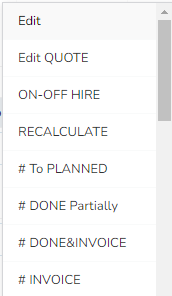
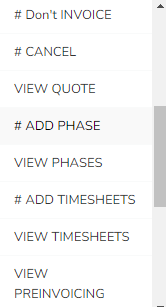
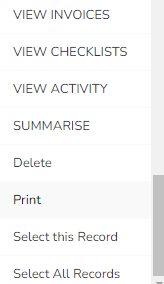
Q: Why is my hire/over-hire not showing/calculating?
- Are you in the current invoicing period, (when this is changed the hire calculation runs overnight, for the hire to show right click on the job and click recalculate)
- Select the job in pre-invoicing and click RECALCULATE
- Is there Hire in the quoted phase you are reviewing
- Is there an ON HIRE or an OFF HIRE date entered for the Phase you are reviewing
Q: Why is the Amount nil/zero value?
- Is the activity set to COMPLETELY/PARTIALLY DONE,
- Does the quote have charges in it?
Q: Why won't it change to “invoiced” or purple?
- Are you in the current invoicing period?
Q: Why does the job stage say “In Progress” when it's fully dismantled?
- RIGHT CLICK and choose VIEW PRE-INVOICING to see ALL of the activities, it may be because you are missing a dismantle on one of your phases
Q: Why is the job showing the wrong hire dates?
- The ON/OFF and or OVERHIRE hire dates are correct by using the right-click on the Pre Invoicing Line or in the Calendar or on the Job right-click Menu.
Q: The amount is wrong - how do I change this amount?
- QUOTE: Go back to the quote check the charges are correct, if they are email support@100rails.com, if not then check with your Manager before you change an agreed price for the customer
- VARIATIONS: If this is a “charge up” situation then edit the variation/adjustment activity’s charges section
Q: Can I delete the hire if not required?
- YES, this will always come back if you accidentally delete by selecting that job and clicking recalculate
Q: Why can't I see all charge lines in pre-invoicing?
- Check if you have a filter on
- Right-click, and click pre invoicing and all charge lines will show for the job
Q: Why do I have an ALERT: The hire Cutoff for this client: "xyz Construction" does not have invoicing Period Date in the Company Setup
- The client has been set up using the wrong cut-off date, go to CRM menu, go to the cutoff date field and set it correctly,
- Go back to Pre-Invoicing and recalculate