How to Exclude Checklist Charges for a Client or Specific Job
Overview:
When it comes to managing client or job charges, it's essential to consider the option of setting a flag that enables the system to ignore and refrain from applying default charges to a checklist of any type. This feature holds significant value in ensuring flexibility and control over the billing process.
By implementing this functionality, businesses can tailor their invoicing and billing procedures better to meet the specific requirements of individual clients or jobs. This can be particularly beneficial in scenarios where certain charges need to be exempted or adjusted based on pre-defined criteria.
NOTE The default charges will be loaded to the Checklist from the default Checklist Type BUT they will not be passed through to the Activity for Charging. This means that if you decide to start charging a client or job you can then un tick the options below and click summarise on the checklists and those charges will be pushed through.
Setup a Client:
Go to the CRM Menu and select the Client List
https://creatorapp.zoho.com/100rails/goscaffold/#Report:Clients_List
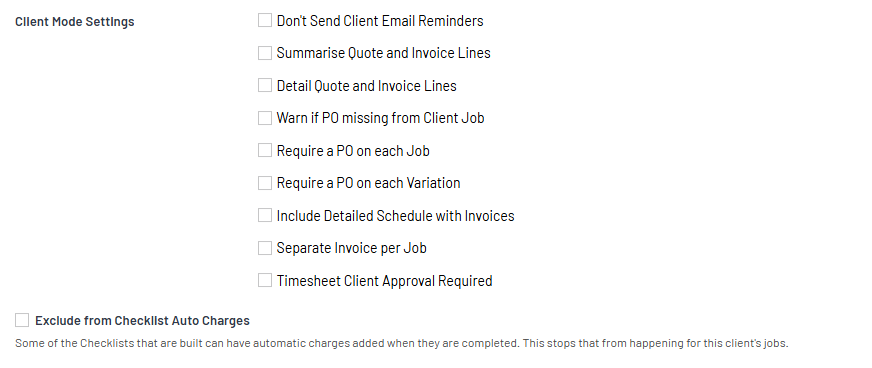
Search for the client and Edit and then scroll and click the "Exclude from Checklist Auto Charges"
Setup the Job
Select the LATEST Jobs or Active Jobs view
https://creatorapp.zoho.com/100rails/goscaffold/#Report:LATEST_Jobs
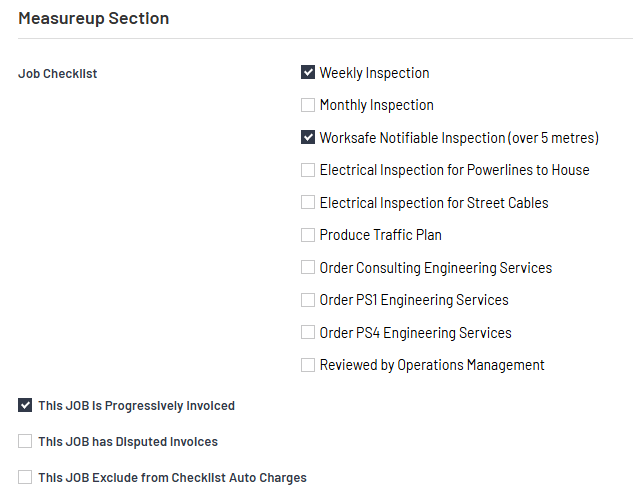
Search for the Job and Edit and then scroll down to the Checkbox that says "This JOB Exclude from Checklist Auto Charges"