MISC: Scaflog Colours for Activity Calendar, Staff and Worktypes
COLOURS on the JOBS Views/Staff or ACTIVITIES Calendar:
Below are the colours that you can select for staff in the HR Staff List or instruct Scaflog to change colours in your work types that show on the Schedule. Email support@100rails.com to find out more.
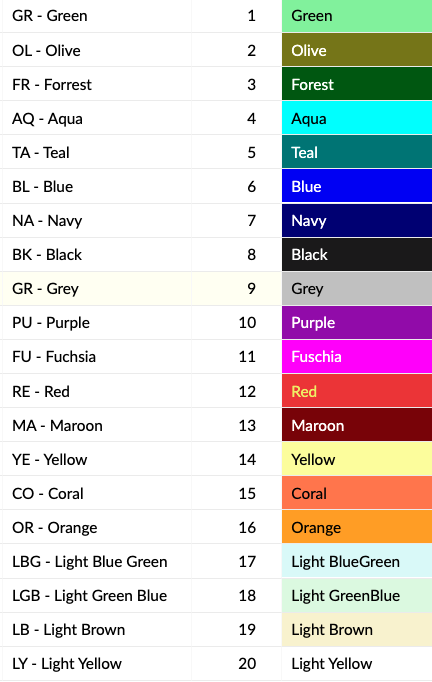
For more advanced users please follow these instructions on how to change the work type/activity colours (check with Scaflog Support before doing this):
- Go to ADMIN menu
- Scroll until you see WorkTypes List and select
- Right click on the work type you want to change the colour of and choose edit
- Choose the calendar colour you want from the list above (the colours do not show, only the names of the colours)
- Scroll down and click UPDATE
Any questions please email support@100rails.com and include a screen shot if possible to help us help you.