JOBS: How to Update or Add a Phase Quote number for Multiple Quotes on the Same Job
OVERVIEW:
Multiple Quotes on a single JOB are possible using the following options while adding and updating phases.
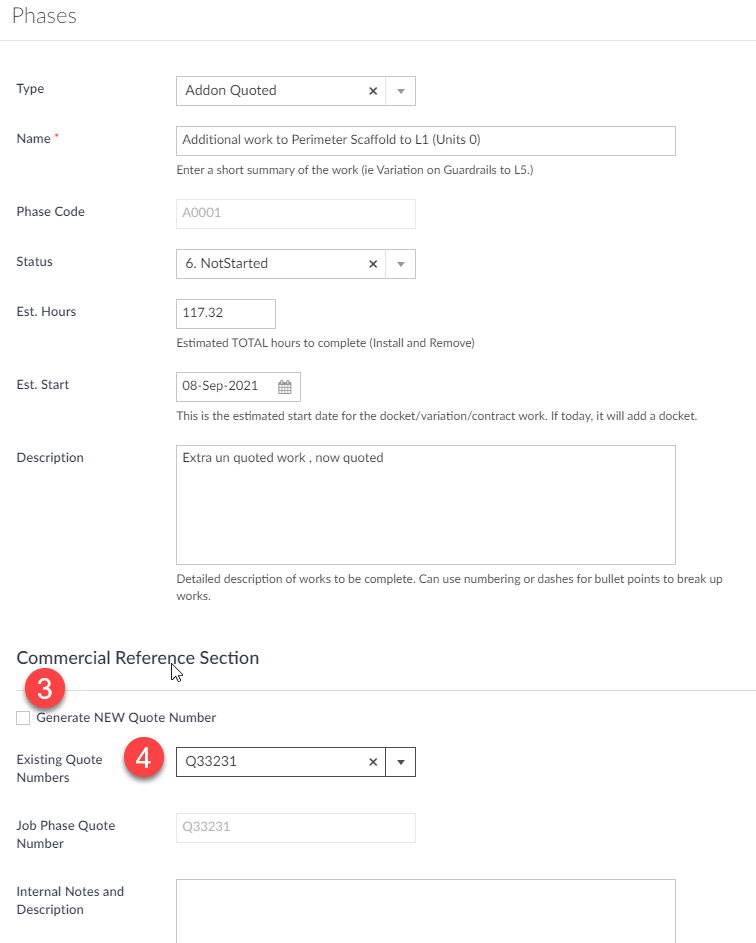
1. Go to the Job you are interested in and EDIT QUOTE
2. Select the Phase you want to Edit or use the + Phase option
3. Generate a New Phase Quote number for this phase
4. OR Select an existing Phase Quote number for this phase
NOTE: It can also be used with a different Quote Template with different wording or layout for those scenarios. It takes 1 hour of development to set it up at the standard DEV hour rate of $75/hr.
NB. Any Phase Quote Number placed on the C000 phase will be defaulted to all other CONTRACTED type phases UNLESS you generate a new quote number.
SETUP:
To utilise Multiple quote numbers of various phases then ensure the following tickbox is set in the company data set (In the PHASES SECTION):
[ ] Include Commercial Planning Reference Section in Phases and Multiple Quotes on Different Phases