Calendar Dates: Invoicing Hire Holidays, Hire Free Weekends plus Payroll Important Dates
OVERVIEW:
You can give your clients FREE HIRE DAYS or FREE HIRE WEEKENDS by using the Calendar Dates in the ADMIN MENU. https://creatorapp.zoho.com/100rails/goscaffold/#Report:Calendar_Dates_View
This view doubles as the calendar for Invoice key dates and payroll key dates.
The types are:
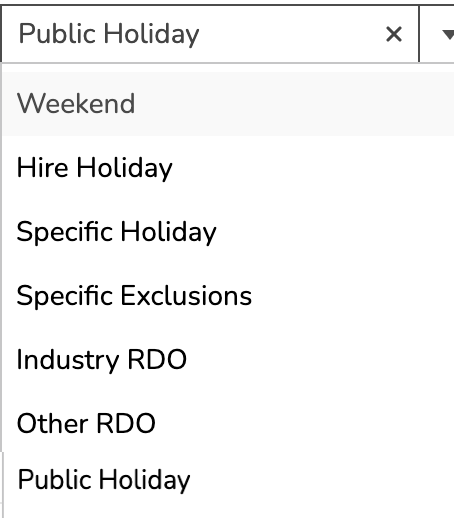
WEEKEND - Signifies this date is classed as a FREE HIRE date for the weekend
HIRE HOLIDAY - Is for a weekday Hire Holiday (useful around Christmas)
SPECIFIC HOLIDAY - Hire only excluded on specific jobs
SPECIFIC EXCLUSIONS - Hire is still charged on the jobs specified
INDUSTRY RDO - Industry normal Rostered Day Off. Causes various changes in the Payroll Awards interpreting
OTHER RDO - Similar but specific to Sites (in the future)
PUBLIC HOLIDAY - Setup for specific Payroll payouts
IF you select SPECIFIC HOLIDAY or SPECIFIC EXCLUSIONS:
You will be required to Specify the Job Numbers that this holiday apply to.
IMPORTANT:
If you want to give hire holidays for almost all your jobs, then use HIRE HOLIDAY and set your dates, then use the SPECIFIC EXCLUSIONS for the job/jobs that you don't want to give those hire holidays to.
VIDEO: